

If you're wondering how to take notes in church without missing the sermon, these are the five methods that work best: the Outline Method, the Cornell Method, the Timestamp Method, the Question Method, and the One-Sentence Summary. Each balances listening and writing differently, and the best choice depends on your learning style and how much effort you want to invest during and after the service.
You sit down in the pew, pull out your phone or notebook, and the pastor starts preaching. Twenty minutes later you look down and find three half-finished sentences and a doodle. Most churchgoers struggle with the same thing: you want to capture what the pastor is saying, but you also want to actually listen, and writing too much means you miss the message while writing too little means you've forgotten it by Monday.
Proven methods solve that tension, and the trick is finding the one that matches how your brain works. Here are five, each striking a different balance between effort during the service and value afterward.
1. The Outline Method
This is the most traditional approach, and it works especially well when the pastor structures the message around clear main points. Write the sermon title and Scripture passage at the top, then listen for the main points as he moves through: those become your top-level headings, and under each one you jot the supporting ideas, illustrations and verses. The method forces you to identify the sermon's structure in real time, which is what helps comprehension, though it gets awkward if the pastor doesn't move linearly or if you write slowly.
It suits structured thinkers who like organized notes, and it is at its best when the outline is already up on screen.
2. The Cornell Method
Developed at Cornell University for academic lectures, this one adapts surprisingly well to sermons. Divide the page into three: a narrow left column, about a third of the width, for key words and questions, a wider right column for notes taken during the message, and a band across the bottom for a summary you write afterward. You take notes in the right column as you normally would, then go back later, even just five minutes in the car, and fill in the left column and a two-sentence summary at the bottom.
That review step is what makes the method powerful. Research consistently shows that reprocessing information shortly after hearing it improves retention dramatically, which means those five minutes after church may be the most valuable part of the whole process. If remembering the sermon long-term is the goal, this is the strongest of the five.
3. The Timestamp Method
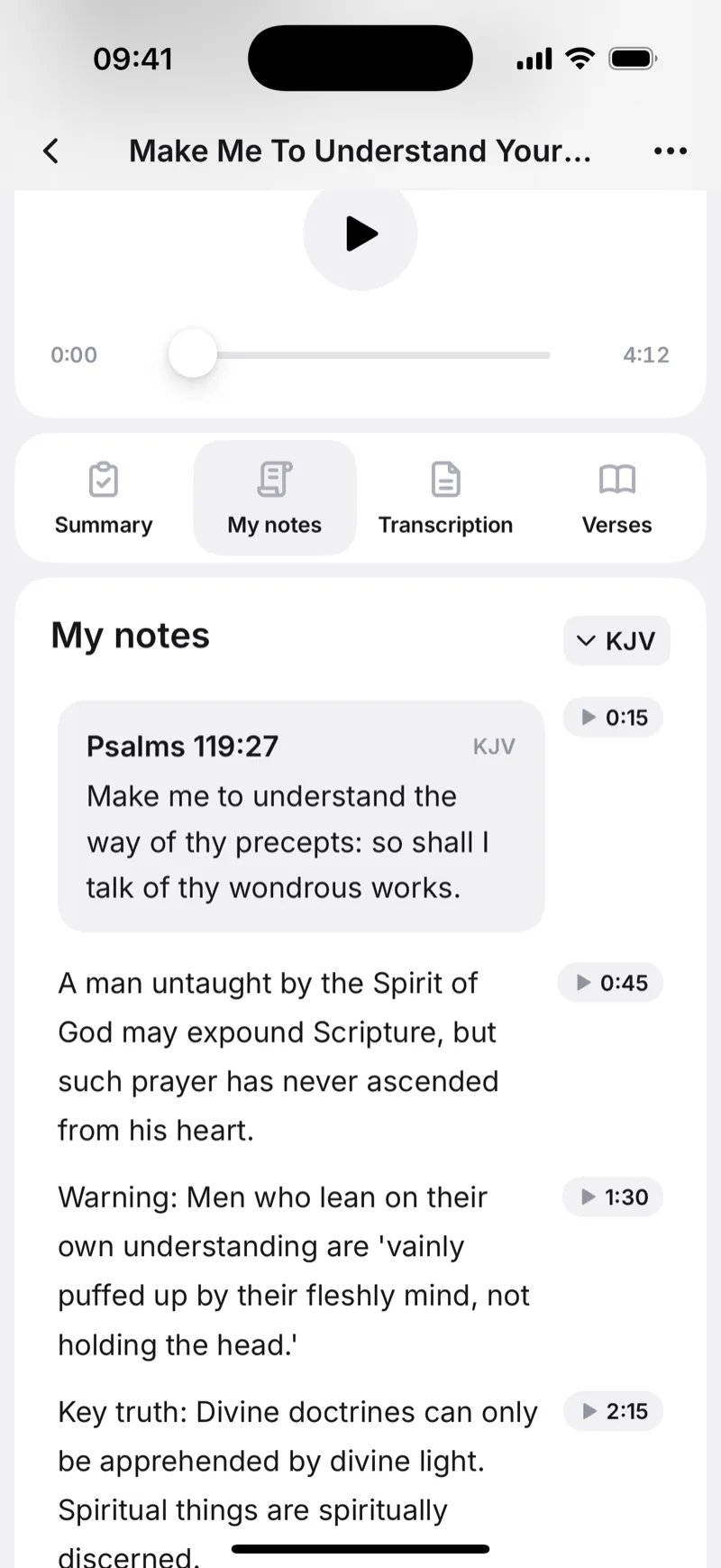
Here's the fundamental problem with traditional sermon notes: the more you write, the less you listen. The timestamp method removes the trade-off entirely. Instead of writing in detail, you record the audio and tap to drop a short note at each key moment, and every note is linked to its exact second in the recording. Something lands at minute 12, so you tap, type two words, "forgiveness story", and keep listening.
Afterward you jump straight to any moment you marked instead of scrubbing through the whole recording, and if you want the full text, AI transcription converts the sermon to readable text with a summary and key points automatically. What you gain is presence: you're not looking down at a notebook, you're listening, and your phone only comes into it when something resonates. It suits anyone who would rather focus on listening than writing, and anyone who wants a complete record without the manual effort. On a budget? Start with the best free sermon notes apps.


4. The Question Method
Instead of trying to capture what the pastor says, write down the questions his words spark. What did Paul mean by "thorn in the flesh"? How does this apply to my situation at work? What's the context of this verse? Those questions are the most valuable thing on the page, because each one marks a moment where the sermon connected with you personally rather than generally.
After church, spend 10 to 15 minutes looking up the answers: open your Bible, search a commentary, ask someone from your small group. You'll engage with the material far more deeply than if you had copied the pastor's words verbatim, and the questions double as discussion fuel to bring to a Bible study group. If you learn by asking why, this is your method.
5. The One-Sentence Summary
This is the lowest-effort, highest-consistency method, and it is the right answer if you have tried the others and given up because they felt like work. The rule is simple: after each major point the pastor makes, write one sentence capturing the idea in your own words. Don't quote him, translate him into language that means something to you.
By the end you'll have three to five sentences. They won't be comprehensive, but they'll be yours, filtered through your own understanding, and because they're short you will actually go back and read them. Many people keep a running list in a single note on their phone, and over months it turns into a genuine record of how their thinking has changed. If your current note-taking habit is nothing at all, start here.
Which Method Is Right for You?
There's no single best way to take sermon notes: it depends on how you learn, how much effort you want to spend, and what you want out of the process afterward. If you're a structured thinker who likes neat organization, try the outline method. If long-term memory matters most, use Cornell with its built-in review. If you want to stay fully present and let technology carry the rest, the timestamp method is hard to beat. If you learn by exploring, go with the question method. And if you need something simple you will actually stick with, start with the one-sentence summary.
Combining them is fair game too. Plenty of people record with the timestamp method and then write a one-sentence summary for each key point afterward. What matters far more than the choice is the consistency: a simple method you use every Sunday will serve you better than a complex system you abandon after two weeks. Notes are also one of the best ways to stay focused, as we explain in how to pay attention in church.
Frequently Asked Questions
The best way depends on your learning style. The Outline Method works well for structured thinkers, the Cornell Method is best for long-term retention thanks to its built-in review step, and the Timestamp Method lets you stay fully present by recording audio and adding short notes at key moments. Start with the method that matches how you naturally process information.
Both work well, but each has advantages. Paper reduces distractions and suits methods like the Cornell and Outline approaches. A phone lets you record audio, add timestamped notes, and use AI transcription to get a full text of the sermon afterward. If you find yourself distracted by notifications, paper may be better. If you want a complete searchable record, a phone or tablet with a sermon notes app is the way to go.
The most effective way to remember sermons is to review your notes shortly after the service. Even five minutes in the car makes a big difference. The Cornell Method is specifically designed for this, with a built-in review step where you write key words and a summary after church. Writing notes in your own words rather than copying the pastor verbatim also improves retention significantly.
Focus on the sermon's main points, supporting Scripture references, and any illustrations or stories that resonate with you. You don't need to write everything. Capturing the big ideas in your own words is more valuable than a word-for-word transcript. Also write down any personal questions or applications that come to mind, as these represent the moments the sermon connected with you personally.
Yes. Sermon note-taking apps like Sermon Keeper let you record the audio while adding timestamped notes at key moments. This means you can stay focused on listening and only jot a few words when something stands out. After the service, you can jump back to any marked moment in the recording, and AI transcription can convert the full sermon into readable text with a summary and key points.