

The best apps for automatic Bible verse detection are: Sermon Keeper (autocompletes verse text as you type references during sermon notes), Spirit Notes (autocomplete with 13 translations), Church Notes App (auto-links verse references), SermonlyAI (detects verses from sermon transcripts), and Bible Gateway (search-based verse lookup). The right choice depends on whether you want verse detection while typing notes, from audio transcripts, or as a standalone lookup tool.
If you've ever been in a sermon, heard the pastor reference "Philippians 4:13," and wished you could instantly see the full verse text without opening a separate Bible app, that's exactly what Bible verse detection solves. Here are five apps that do it, each with a different approach.
Quick Comparison
| App | Detection Method | Translations | Works During Recording | Platform | Price |
|---|---|---|---|---|---|
| Sermon Keeper | Autocomplete while typing | 7 offline: KJV, NASB 1995, ESV, NKJV, NIV 1984, WEB, RVR 1909 | Yes | iOS | Free trial · $6.99/mo · $64.99/yr |
| Spirit Notes | Autocomplete while typing | 13 translations | Yes | iOS | Free / Premium |
| Church Notes App | Auto-link references | Multiple | Yes | iOS, Android, Web | Free / Premium |
| SermonlyAI | AI detection from transcript | Multiple | No (post-recording) | Web, Mobile | Free / Premium |
| Bible Gateway | Search / lookup | 50+ | N/A (manual search) | iOS, Android, Web | Free |
How Bible Verse Detection Works
There are four fundamentally different approaches to detecting Bible verses in apps:
1. Autocomplete while typing. You type a reference like "John 3:16" in your notes, and the app instantly fills in the full verse text: "For God so loved the world, that he gave his only begotten Son..." This happens in real time as you take notes during the sermon. Sermon Keeper and Spirit Notes use this approach.
2. Auto-linking from transcripts. After a sermon is transcribed to text, AI scans the transcript and identifies Bible references mentioned by the pastor. Each reference is linked to the full verse text. SermonlyAI uses this approach.
3. Manual search. You open a Bible app and search for the reference yourself. Bible Gateway and YouVersion are the most popular options. This works but requires switching between apps during the sermon. If the notation itself is the stumbling block, here's how to read Bible references.
4. Matching the translation that was read aloud. A sermon recording is transcribed, and the words the preacher actually said are compared against the wording of several Bible translations. When the match is clear, the verse is shown in the translation that was read from the pulpit, not the one you picked in settings. Sermon Keeper is the only app here that does this.
Detailed Reviews
1. Sermon Keeper: Best for Sermon Notes with Autocomplete
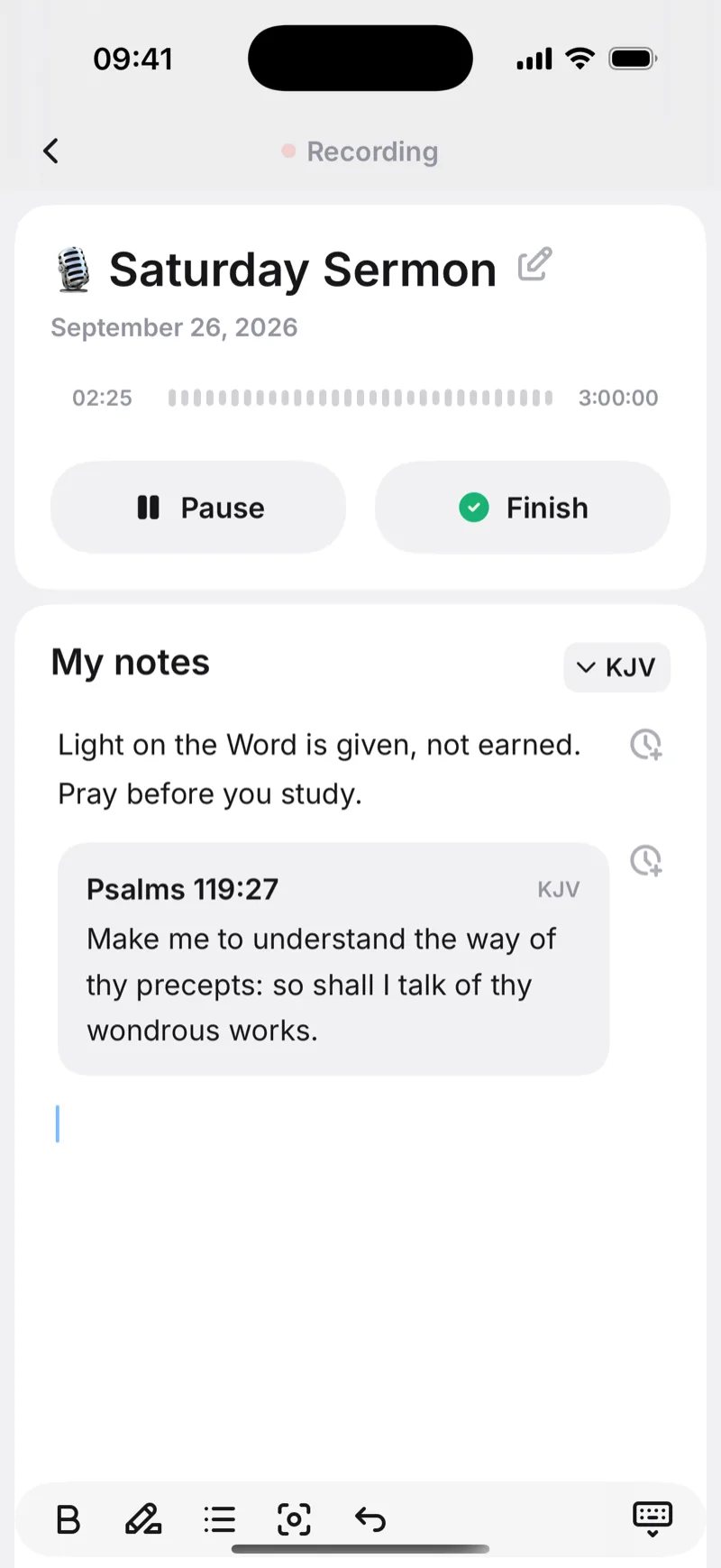
Sermon Keeper detects Bible references as you type them in your notes. Type "John 3:16" and the full verse appears, with no copy-pasting from a Bible app. Seven complete translations are embedded in the app — KJV, NASB 1995, ESV, NKJV, NIV 1984, WEB and Reina-Valera 1909 — so every one of them works with no signal at all, which matters in a sanctuary where the bars drop to nothing. If a verse is missing from the translation you chose, the KJV text is shown instead and labelled as KJV, so you always know where the words came from.
It also does something no other app on this list does. After the sermon is transcribed, the app compares what the preacher said with the wording of each translation. If he read the whole message from the NKJV while your own setting is the ESV, the verses come back in the NKJV — the words you actually heard.
All of this happens around a live recording, which means you capture the sermon audio and annotate it with complete verse text in one step. The limits are real but narrow: iPhone only, and the detection of the spoken translation covers the English texts.


2. Spirit Notes: Best for Multiple Translations
Spirit Notes runs the same autocomplete across 13 translations, the widest selection of any sermon notes app: KJV, NIV, ESV, NKJV, NLT, NASB, CSB and more. If your church reads from a specific one and you want that exact wording in your notes, this is the strongest option. You set a preferred translation once in settings and every verse you autocomplete uses it. Recording and timestamped notes are included, and the interface was designed for church rather than adapted from a general notes app.
What you give up is the AI layer. There is no transcription and no sermon summary, so the app keeps what you write rather than what was said, and anything you miss in the moment stays missed. Like most of this category, it is iOS only.
3. Church Notes App: Best Cross-Platform Option
Church Notes App detects references and auto-links them instead of inserting the text. As you type, it recognizes patterns like "Romans 8:28" and turns them into tappable links that open the full verse in a side panel. That keeps the page clean, which matters if you write a lot and would rather not have every reference expand into three lines of Scripture. It is the only cross-platform option here, running on iOS, Android and web, with multiple translations, audio recording with timestamps, and SOAP devotion templates.
The trade-off is one tap between you and the words. To reread a verse later you have to open it rather than skim it in place, which is the opposite of what autocomplete gives you. User reviews are also mixed on how often the app prompts for a subscription.
4. SermonlyAI: Best for Post-Sermon Verse Detection
SermonlyAI works from the other end. You upload or record a sermon, it transcribes the audio, then scans the text for every Bible reference the pastor mentioned. It catches the explicit ones, "turn to Romans 8", and the contextual ones, "Paul wrote to the church in Rome", and links each to full text across multiple translations. That means it finds the references that flew past too fast to write down, which is most of them. Sermon theme analysis and spiritual growth tracking come with it.
The catch is timing. Nothing happens until the sermon is over, so it cannot help you during the service, and detection is only as good as the transcription underneath it. Pricing is not published either, so you will not learn the cost until you are inside the app.
5. Bible Gateway: Best Free Lookup Tool
Bible Gateway is not a detection app at all. It is a search tool, and it earns a place here because it is what most churchgoers actually reach for when the pastor names a verse. You open the app or the website, type a reference, and the text appears across more than 50 translations and several languages, free, with no account. Then you copy and paste it into your notes.
That last step is the whole problem. Every lookup means leaving your notes, switching apps, and coming back, and doing that mid-sermon breaks the attention you came for. Bible Gateway is fast and reliable at what it does. It simply has no connection to your recording or your notes.
Can Any App Identify Bible Verses from Audio in Real Time?
This is the question people ask most about verse detection, and the honest answer is that no app does it yet. Real-time identification from audio, where the app listens to the pastor speak and instantly shows which verse is being referenced, is a genuinely hard problem. It needs all four of the following at once:
- Real-time speech-to-text transcription with theological accuracy
- Natural language understanding to detect paraphrased verses, not just explicit references
- A massive Bible database to match against multiple translations
- Low enough latency to display results while the pastor is still speaking
The closest current approach is a two-step process: (1) record the sermon, (2) transcribe and detect verses after the service. Apps like Sermon Keeper and SermonlyAI handle this workflow. The detection happens within minutes of recording, not in real time, but the result is close: the Bible references mentioned in the sermon are identified and listed in the summary.
Frequently Asked Questions
Yes. Several apps detect Bible verses automatically. Sermon Keeper autocompletes Bible verse text as you type references like 'John 3:16' in your notes. Spirit Notes offers Bible verse autocomplete with 13 translations. Church Notes App detects verse references and links them to full text. SermonlyAI identifies Bible references from sermon transcripts using AI. The approach varies: some work while you type, others detect verses after transcribing audio.
Yes, but indirectly. No app currently listens to audio and identifies verses in real time. Instead, apps like Sermon Keeper and SermonlyAI first transcribe the sermon audio to text, then scan the transcript for Bible references (e.g., 'Romans 8:28', 'the book of James chapter 1'). This approach is reliable for explicit references but may miss paraphrased verses.
It varies by app. Spirit Notes supports 13 translations including KJV, NIV, ESV, NKJV, NLT, and NASB. Sermon Keeper ships seven complete translations that work offline: KJV, NASB 1995, ESV, NKJV, NIV 1984, WEB and Reina-Valera 1909. Church Notes App supports multiple translations. Bible Gateway and YouVersion support 50+ translations but are search tools, not verse detection tools. Check each app's current translation list, as they update regularly.
Bible verse autocomplete is a feature in sermon notes apps where you start typing a verse reference (like 'John 3:16') and the app automatically fills in the full verse text. This saves you from switching to a separate Bible app to look up and copy the text. Sermon Keeper and Spirit Notes both offer this feature: you type the reference, and the full verse appears in your notes instantly.
No app currently identifies Bible verses from live audio in real time. The closest approach is: (1) record the sermon with an app like Sermon Keeper, (2) the app transcribes the audio after the service, and (3) Bible references mentioned in the sermon are detected and listed in the AI summary. This typically takes a few minutes after recording. Real-time verse detection from audio remains a technically challenging problem that no consumer app has solved yet.